Exception Propagation
When an exception is thrown inside a method and that method doesn’t handle it, Java automatically passes it up to the calling method. This journey up the call stack is called exception propagation — and understanding it is key to writing clean, predictable error-handling code.
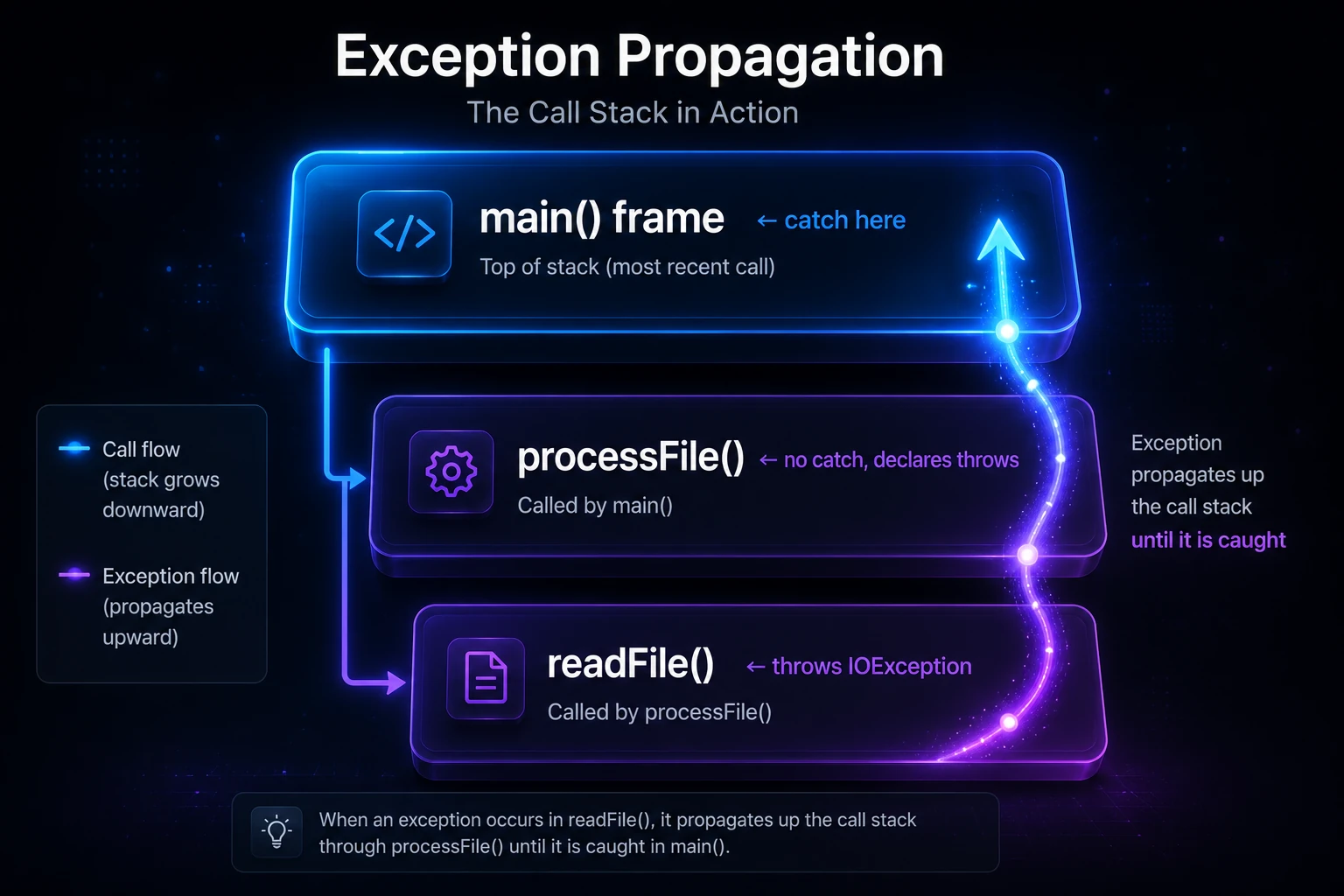
What Is Exception Propagation?
Every time you call a method in Java, a new frame is pushed onto the call stack. When an exception is thrown, Java looks for a matching catch block in the current frame. If it doesn’t find one, the exception propagates — the current frame is popped off the stack and Java checks the caller’s frame. This continues until either a matching catch is found, or the exception reaches the bottom of the stack (main), at which point the JVM prints a stack trace and terminates the thread.
public class PropagationDemo {

    static void methodC() {
        int result = 10 / 0; // ArithmeticException thrown here
    }

    static void methodB() {
        methodC(); // no catch — exception propagates up
    }

    static void methodA() {
        methodB(); // no catch — exception propagates up
    }

    public static void main(String[] args) {
        try {
            methodA();
        } catch (ArithmeticException e) {
            System.out.println("Caught in main: " + e.getMessage());
        }
    }
}
Output:
Caught in main: / by zeroThe exception originated in methodC, skipped methodB and methodA (neither caught it), and was finally handled in main.
How Propagation Differs: Unchecked vs Checked
The rules for propagation depend on whether the exception is checked or unchecked.
| Feature | Unchecked (RuntimeException) | Checked (Exception subclass) |
|---|---|---|
Must declare with throws? | No | Yes |
| Propagates automatically? | Yes | Yes, but only if declared |
| Compiler enforces handling? | No | Yes |
| Common examples | NullPointerException, ArithmeticException | IOException, SQLException |
Unchecked Exception Propagation
Unchecked exceptions propagate silently — no throws declaration is needed at each level. This makes them convenient but also easy to miss.
public class UncheckedPropagation {

    static void level3() {
        String s = null;
        System.out.println(s.length()); // NullPointerException
    }

    static void level2() {
        level3(); // no throws needed
    }

    static void level1() {
        level2(); // no throws needed
    }

    public static void main(String[] args) {
        try {
            level1();
        } catch (NullPointerException e) {
            System.out.println("Caught NullPointerException: " + e.getMessage());
        }
    }
}
Output:
Caught NullPointerException: Cannot invoke "String.length()" because "s" is nullChecked Exception Propagation
Checked exceptions must be either caught or declared with the throws keyword. Every method in the call chain that doesn’t handle the exception must declare it — otherwise the code won’t compile.
import java.io.*;

public class CheckedPropagation {

    // Must declare IOException because we're not catching it
    static void readFile(String path) throws IOException {
        FileReader reader = new FileReader(path); // may throw IOException
        reader.close();
    }

    // Must also declare IOException to let it propagate
    static void processFile(String path) throws IOException {
        readFile(path);
    }

    public static void main(String[] args) {
        try {
            processFile("missing.txt");
        } catch (IOException e) {
            System.out.println("File error: " + e.getMessage());
        }
    }
}
Output:
File error: missing.txt (No such file or directory)Note: Forgetting
throws IOExceptiononprocessFilewill cause a compile-time error: “Unhandled exception type IOException”. The compiler enforces the contract.
The Call Stack in Action
It helps to picture the call stack as a stack of frames. As each method is called, a frame is pushed. When a method returns (or throws without catching), its frame is popped.
main() frame        ← catch here
  └─ processFile()  ← no catch, declares throws
       └─ readFile() ← throws IOException
When readFile throws, the JVM walks up through the frames (popping each one) searching for a matching catch. This process is sometimes called stack unwinding.
Tip: The full path of frames at the moment of the throw is what you see in a stack trace — read it from bottom to top to trace the origin of the exception.
Partial Handling: Re-throwing an Exception
Sometimes you want to catch an exception, do some cleanup or logging, then let it continue propagating. You can re-throw the same exception or wrap it in a new one.
import java.io.*;

public class RethrowDemo {

    static void riskyOperation() throws IOException {
        throw new IOException("Disk full");
    }

    static void middle() throws IOException {
        try {
            riskyOperation();
        } catch (IOException e) {
            System.out.println("Logging error in middle(): " + e.getMessage());
            throw e; // re-throw — propagate to caller
        }
    }

    public static void main(String[] args) {
        try {
            middle();
        } catch (IOException e) {
            System.out.println("Final handler in main: " + e.getMessage());
        }
    }
}
Output:
Logging error in middle(): Disk full
Final handler in main: Disk full
Wrapping in a New Exception (Exception Chaining)
You can also wrap a lower-level exception in a higher-level one using the cause constructor argument. This preserves the original exception and keeps your abstraction layers clean.
static void service() throws RuntimeException {
    try {
        riskyOperation();
    } catch (IOException e) {
        // Wrap checked exception in unchecked — caller doesn't need to handle IOException
        throw new RuntimeException("Service failed", e);
    }
}
Calling getCause() on the RuntimeException will return the original IOException. This technique is known as exception chaining and is widely used in frameworks and libraries.
Warning: Swallowing exceptions (catching and doing nothing) silently hides bugs. At minimum, log the exception before swallowing it.
finally and Propagation
The finally block always executes, even when an exception is propagating through a method. This makes it ideal for releasing resources.
static void withFinally() throws Exception {
    try {
        throw new Exception("Something went wrong");
    } finally {
        System.out.println("finally runs even during propagation");
    }
}

public static void main(String[] args) {
    try {
        withFinally();
    } catch (Exception e) {
        System.out.println("Caught: " + e.getMessage());
    }
}
Output:
finally runs even during propagation
Caught: Something went wrong
Warning: If a
finallyblock itself throws an exception, it replaces the original exception and the original is lost. Be careful about throwing insidefinally.
Under the Hood
When the JVM throws an exception, it creates an Exception object on the heap and fills in the stack trace by capturing the current call stack (an array of StackTraceElement objects). Each element records the class name, method name, file name, and line number.
Stack unwinding is handled by the JVM’s exception table — a data structure embedded in each compiled method’s bytecode. The table maps ranges of bytecode instructions to handler addresses (the catch blocks). The JVM scans this table linearly when searching for a matching handler. If no handler is found in the current method, the frame is popped and the search continues in the caller.
Filling in the stack trace is the most expensive part of throwing an exception (it involves walking the native thread stack). That’s why you should avoid using exceptions for normal control flow — the performance cost is not trivial. For hot paths, some frameworks even pre-create exception objects to skip trace capture, though this is an advanced optimization you’ll rarely need.
You can also override fillInStackTrace() in a custom exception subclass to return this without capturing a trace, making it faster to throw:
public class FastException extends RuntimeException {
    @Override
    public synchronized Throwable fillInStackTrace() {
        return this; // skip expensive stack capture
    }
}
See Custom Exceptions for more on building your own exception hierarchy.
Common Mistakes
- Catching too broadly: Catching
ExceptionorThrowableat a high level can hide bugs. Catch only what you can meaningfully handle. - Losing the cause: When re-throwing, always pass the original exception as the
causeso you don’t lose diagnostic information. - Declaring too many
throws: If every method in your app declaresthrows Exception, you’ve effectively disabled the type-safety benefit of checked exceptions. - Ignoring propagation in threads: Exceptions thrown in a child thread do not propagate to the parent thread — they must be handled with
Thread.UncaughtExceptionHandleror via Callable & Future.
Related Topics
- throws Keyword — how to declare that a method propagates a checked exception
- throw Keyword — manually triggering exception propagation
- try-catch Block — where propagation stops and handling begins
- finally Block — code that runs regardless of propagation
- Custom Exceptions — defining your own exception types for richer propagation chains
- Callable & Future — handling exceptions that propagate across thread boundaries